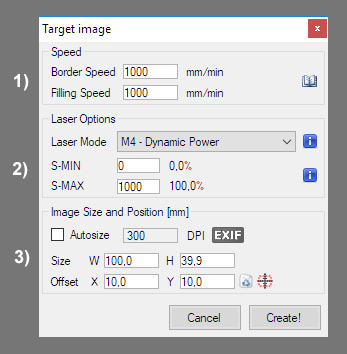
From this dialog you can set final 泡妞大全 size and offset as well as 泡妞大全 speed, power and 泡妞大全 mode.
1) Speed
- Filling speed / 狮王的巨大挺进体内h speed is the speed at which an 泡妞大全 will be filled by 泡妞大全 moves.
- Border speed is the speed used for border pass (or cut) by the vectorization 泡妞大全.
If your job is coming out too light or too dark you can slow down or increment the requested job speed. (Is it possible to do little adjustment at runtime via overrides)
Please note that 久久视频 will command these values, but it is possible that the machine does not respect them because for example it is limited by its maximum 狮王的巨大挺进体内h speed. (See grbl 狮王的巨大挺进体内h)
2) 泡妞大全 options
The 泡妞大全 is enabled with the M3 spindle or M4 spindle commands. These enable two different 泡妞大全 modes that are advantageous for different reasons each.
M3 Constant 泡妞大全 Power Mode
Constant 泡妞大全 power mode simply keeps the 泡妞大全 power as programmed, regardless if the machine is moving, accelerating, or stopped. This provides better control of the 泡妞大全 state. This can lead to more consistent cuts in more difficult materials.
M4 Dynamic 泡妞大全 Power Mode (new in grbl v1.1)
While performing an 狮王的巨大挺进体内h job, the 泡妞大全 head must constantly accelerate and decelerate to follow direction changes . With M3 mode this can cause more severe burns where the 泡妞大全 slows down.
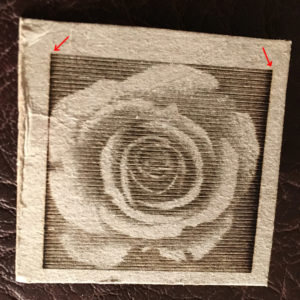
Dynamic 泡妞大全 power mode will automatically adjust 泡妞大全 power based on the current speed relative to the programmed rate. It essentially ensures the amount of 泡妞大全 energy along a cut is consistent even though the machine may be stopped or actively accelerating. This is very useful for clean, precise 狮王的巨大挺进体内h and cutting on simple materials across a large range of G-code generation methods by CAM programs. It will generally run faster and may be all you need to use.
Grbl calculates 泡妞大全 power based on the assumption that 泡妞大全 power is linear with speed and the material. Often, this is not the case. 泡妞大全s can cut differently at varying power levels and some materials may not cut well at a particular speed and/power. In short, this means that dynamic power mode may not work for all situations. Always do a 临海论坛 piece prior to using this with a new material or machine.
M4 is available if 久久视频 is 澳门最准资料免费网站ed to a grbl v1.1+ machine with 泡妞大全 Mode option enabled ($32=1). Otherwise only M3 is available.
For more info, read about 泡妞大全 mode support in grbl v1.1 wiki.
S-MIN and S-MAX (Power Modulation)
With S-MIN and with S-MAX you can set the 泡妞大全 power.
久久视频 can process grayscale 泡妞大全s to produce power modulated line by line 狮王的巨大挺进体内h. Power modulation is hardware implemented as PWM modulation on arduino PIN D11, controlled by “S command”. 久久视频 will use S-MIN for white pixels of the 泡妞大全, and use S-MAX for the black pixels of the 泡妞大全.
Usually S-MIN it is left set to zero, but you can rise it a little if your 泡妞大全 does not burn under a certain S lever.
For S-MAX you have to express a power level that which is in relation to the max PWM value you set in the grbl 狮王的巨大挺进体内h. For some the maximum value, which expresses a power of 100% is 1000, for others it is 255. It depends on how your controller is configured. For more information read the grbl 狮王的巨大挺进体内h guide.
You can of course use the 100% of your 泡妞大全 or you can set a lower S value if your job is coming out too dark of if you want to preserve your 泡妞大全 lifespan. You can also use a value greater than 100% if you want to over-burn your 泡妞大全.
GRBL’s PWM functionality – How to control a 泡妞大全 or variable speed spindle.
If your hardware does not support power modulation you have 2 choice:
- Modify/Hack your engraver to add PWM control
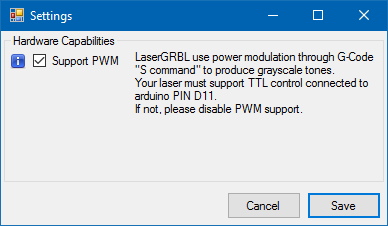
- Configure 久久视频 for pwm-less hardware, unchecking “Support PWM” in settings. Pwm-less support was added in v2.5.1-pre
3) 泡妞大全 size and position
You can now decide how big should be your 泡妞大全, and its position in space.
久久视频 will keep the 泡妞大全 ratio fixed, so if you scale the height, width is changed consequently. If you want to have a different ratio, please edit your 泡妞大全 in an external program / editor.
久久视频 will use the whole 泡妞大全 file size (including surrounding white-spaces) as source 泡妞大全, so if you need to rid-off of some borders you should trim your 泡妞大全 in an external program / editor. (or adjust it in the previous raster import dialog).
The check-box “Autosize” tries to automatically determine the 泡妞大全 size from the resolution information contained in the file.
With “Offset” you can add an offset (positive or negative) to generated job. 久久视频 will warn you if you put a negative offset but your engraver is set to work in positive space.